
AI Voice Changer – Transform Your Voice Online Instantly
Rate this Tool
Average Score
Total Votes
Select your score (1-10):
Detail Information
What
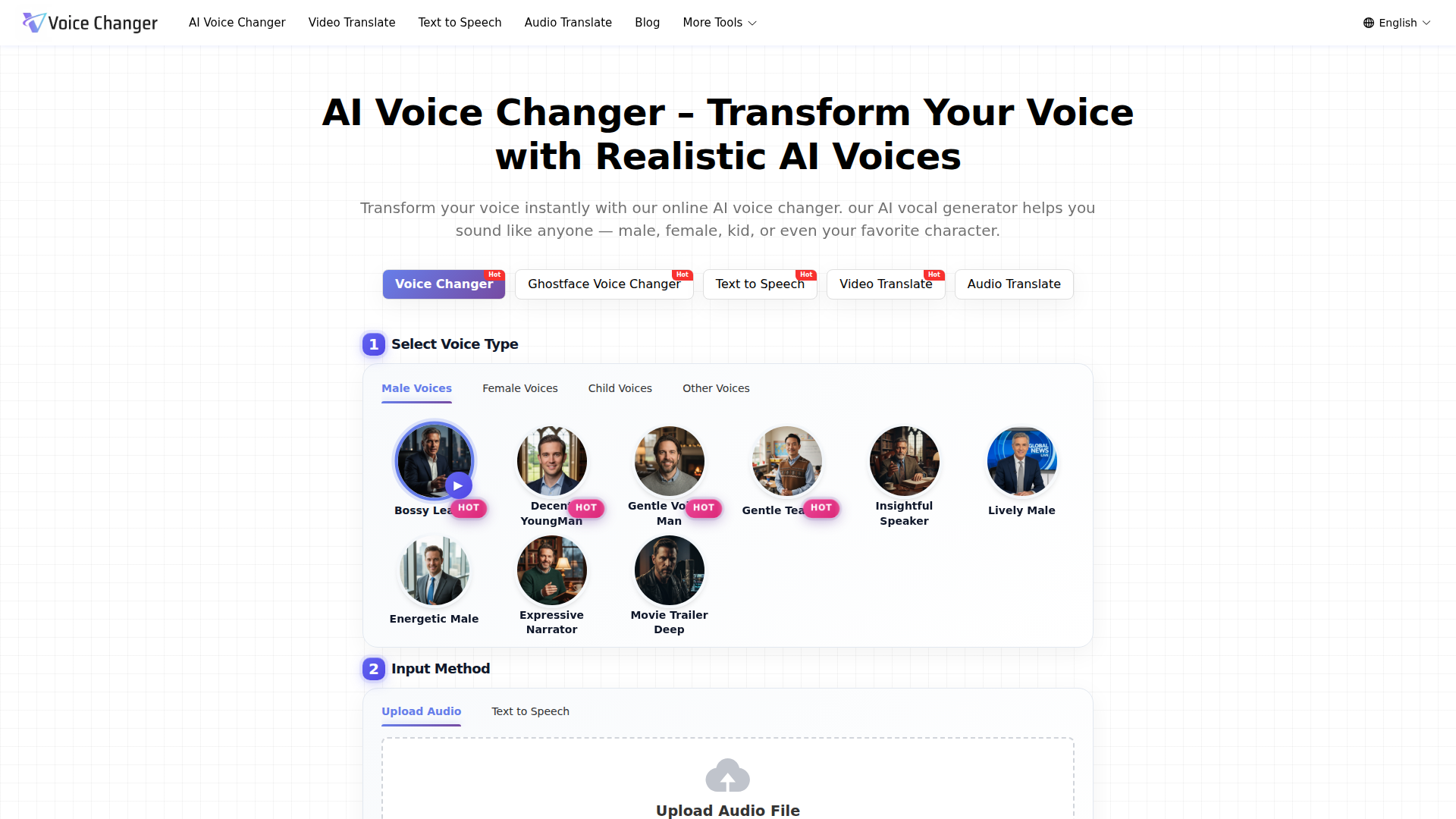
AI Voice Changer is a browser-based voice transformation tool that converts uploaded audio or entered text into a different synthetic voice. It is positioned as a general-purpose online voice changer for creators, educators, marketers, streamers, and business users who need alternate voice styles without recording new takes or hiring voice actors.
The workflow is straightforward: select a target voice, upload audio or enter text, choose an emotion setting, then generate, preview, and download the output. Based on the page, the product sits between consumer voice entertainment and practical voiceover production, with adjacent tools for text to speech, video translation, audio translation, sound effects, and audiobooks.
Features
- Voice type selection: Users can choose from male, female, child, and other voice categories, which helps match narration or character style to the intended use case.
- Audio upload and text input: The tool accepts either uploaded audio or typed text, supporting both voice transformation and synthetic voice generation workflows.
- Emotion controls: Settings such as neutral, happy, sad, angry, fearful, disgusted, and surprised allow users to shape delivery style for different content contexts.
- Multi-format file support: The page states support for MP3, WAV, M4A, and other formats, making it easier to work with common source files and export outputs.
- Browser-based generation: No installation is required, which lowers setup friction for quick experiments, simple production tasks, or occasional use.
- Downloadable output: Generated audio can be previewed and downloaded in MP3, WAV, or FLAC, which supports reuse in video, podcast, training, or presentation workflows.
Helpful Tips
- Test voice fit by use case: Character-style voices may suit entertainment content, while training, marketing, and support materials usually benefit from clearer and more neutral voices.
- Validate quality on longer scripts: Short demos can sound strong, but buyers should test full narration passages to assess pacing, consistency, and listener fatigue.
- Check input constraints early: The page mentions file size and duration limits, so teams with longer recordings should confirm whether chunking or batch workflows are needed.
- Review emotion settings carefully: Emotional controls can improve expressiveness, but overuse may reduce credibility in instructional or business communication.
- Treat security claims conservatively in procurement: The site says uploads are encrypted and deleted after processing, but enterprise buyers should still verify retention, access, and governance details before broader adoption.
OpenClaw Skills
Within the OpenClaw ecosystem, this product could likely support skills for automated voiceover generation, character voice routing, and multilingual media preparation. A likely workflow would let an OpenClaw agent take a script, classify its audience and tone, select an appropriate synthetic voice, generate multiple variants, and send the chosen version into video, podcast, training, or product-demo pipelines. The adjacent presence of text-to-speech, video translation, and audio translation tools also suggests useful orchestration opportunities, though the page does not confirm native OpenClaw integration.
For target professions such as content marketing, education, and media production, OpenClaw-based agents could likely turn this tool into part of a higher-level production system rather than a standalone generator. For example, an agent could create role-specific narration packs for onboarding, localize campaign assets into multiple languages, or generate alternate character reads for gaming and animation prototypes. The practical shift would be from manual voice asset creation toward semi-automated editorial workflows, where teams spend more time reviewing voice fit and message quality than managing raw recording logistics.
Embed Code
Share this AI tool on your website or blog by copying and pasting the code below. The embedded widget will automatically update with the latest information.
<iframe src="https://www.aimyflow.com/ai/voicechanger-video/embed" width="100%" height="400" frameborder="0"></iframe>